Anyone running an Instagram fashion account knows the struggle: taking photos is easy, but creating videos is a total headache. When I first started out, I’d snap tons of OOTD (Outfit of the Day) photos every day; posting them to my Feed was a breeze, but Reels are currently the key to gaining exposure. The problem was, I had absolutely no video editing skills—turning raw footage into a finished video would take me at least an hour, every single time. Then, I discovered an AI tool called Viewmax. Its standout feature is that it integrates video generation, scriptwriting, AI voiceovers, and automatic subtitles all within a single platform. Below, I’ll share the workflow I use most often. The entire process takes just three simple steps.
Step 1: Upload Your Outfit Photos and Generate a Dynamic Video with a Single Click
This is one of my favorite features. Since I already take plenty of outfit photos, my biggest need isn’t to shoot new footage, but rather to transform those static images into dynamic, engaging videos.
I typically prepare the following in advance:
One full-body outfit shot
One close-up of my upper body
One detail shot of an accessory
After opening Viewmax, I head straight to the AI Video Generator. You simply need to upload anywhere from one to three images.
Next, the system prompts me to select a video style.
The styles I use most frequently are:
Fashion
Chic
Cinematic
Especially the “Cinematic” style. Once generated, the video automatically incorporates dynamic camera movements—such as push-ins, pans, and zooms. Previously, I would have had to manually adjust these effects frame-by-frame in editing software. Now, I can get it all done in just a few minutes.
When I first tried it, I was actually a bit skeptical about the results. After all, many AI tools are heavily hyped, but the videos they actually produce often look stiff and unnatural. To my surprise, however, Viewmax generates videos with relatively natural-looking camera movements; they don’t just look like simple images being zoomed in and out. This is particularly effective when showcasing outfit details, as dynamic camera work is far more likely to grab a user’s attention and keep them watching than a static image.
I even tested the same outfit content side-by-side. When I posted it as a standard photo post, the average engagement rate wasn’t particularly high. However, once I converted it into a Reel, the view count skyrocketed. This is a major reason why I subsequently shifted my strategy to focus heavily on publishing content in video format.
Step 2: Use AI to Generate Scripts and Voiceovers
In the past, the thing that gave me the biggest headache wasn’t actually the video editing—it was writing the captions and scripts. All too often, I’d finish editing a video only to find myself at a loss for what to say. If the script was too generic, viewers would easily swipe away. And if I tried recording my own voiceover, I’d frequently have to re-record it multiple times due to background noise or simply not being in the right headspace.
Eventually, I started using Viewmax’s “Scriptwriter” feature.
For instance, if my outfit for the day consisted of a white shirt, straight-leg jeans, and loafers, I would simply input the following prompt: “Today’s OOTD | Effortless French Vibes: A white shirt paired with straight-leg jeans—a look that elongates the figure and slims the silhouette, perfect for both commuting and weekend outings.”
The system quickly generates a script perfectly tailored to the fast-paced rhythm of short-form videos. Typically, the length is kept to around 15 seconds.
This is a crucial point, as Instagram Reels users have extremely limited attention spans; an overly long script can significantly lower your video’s completion rate. Once the script is generated, I immediately utilize the “AI Voiceover” feature. I personally prefer selecting a gentle, natural-sounding female voice. After a quick preview, it rarely requires any further tweaking.
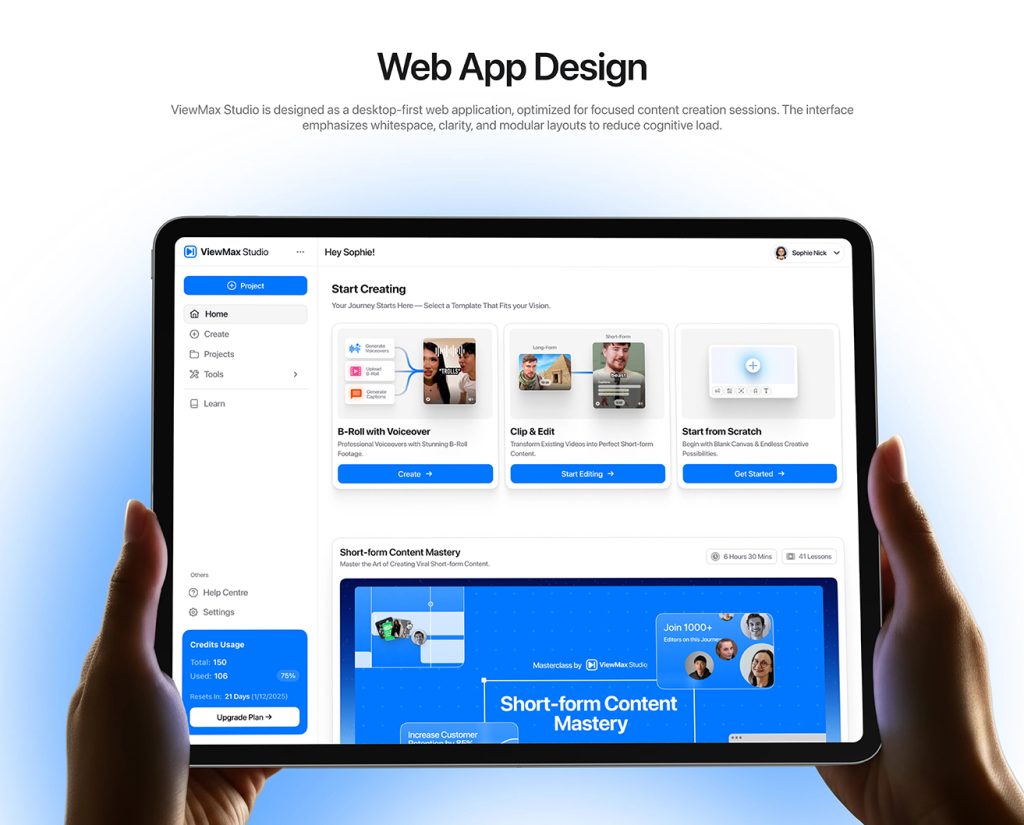
Compared to recording my own voice, the biggest advantage is consistency. No matter when I produce content, the audio quality remains uniform. This feature is particularly convenient for creators running “faceless accounts”—those where the creator does not appear on camera—as it allows the video to possess a complete narrative arc even without a visible host. In the past, I often abandoned content ideas simply because I couldn’t be bothered to record a voiceover; now, the entire process is almost entirely automated.
Step 3: Auto-Captions and Exporting
Many creators overlook a critical detail: subtitles actually have a direct impact on a video’s completion rate. This is because a large number of users scroll through Reels with their audio muted. Without subtitles, even excellent content can fail to retain a significant portion of its audience.
Previously, I used other video editing software to add subtitles. My biggest pain point was the need to constantly tweak the timeline; sometimes, if a single word appeared at the wrong moment, the result would look jarring and awkward.
With Viewmax, however, I simply use the “Auto Captions” feature. The system automatically generates subtitles based on the voiceover track. I then select one of the popular subtitle templates designed for Reels.
Typically, I opt for:
Clean, white text
High-contrast fonts
A stylish, modern aesthetic
From there, I just make minor color adjustments to align with my account’s specific visual branding. The entire process takes only a few minutes. Once I’ve confirmed everything looks correct, I export the video directly. The default output format is the 9:16 vertical aspect ratio—perfectly optimized for Instagram Reels. As soon as the export is complete, I upload it straight to Instagram. The entire workflow is incredibly smooth and seamless.
Why I Stick with This Method
To be honest, I don’t believe AI tools can replace true creativity. What truly determines whether a piece of content goes viral remains the choice of topic and aesthetic sensibility. However, AI can help us solve the problem of execution efficiency. Previously, producing a single outfit video would take me at least an hour.
Now:
Image-to-video generation
AI scriptwriting
AI voiceover
Automatic subtitles
One-click export
The entire process usually takes no more than 10 minutes.
This means I can dedicate more of my time to:
Researching trending topics
Identifying viral content ideas
Refining my account’s niche/positioning
Improving the quality of my outfit content
Rather than wasting time on repetitive video editing tasks.
My Actual Performance Metrics
After consistently updating my account using this method, I noticed a significant shift in my account’s performance.
First, my posting frequency increased. Previously, I could only publish a few pieces of content per week; now, I can essentially maintain a daily posting schedule. Second, my video views have become much more stable. While not every video goes viral, my overall exposure is noticeably higher than in the past.

What pleases me most is the boost in engagement rates. Thanks to the faster pacing of the videos and the clearer subtitles, user watch time has increased significantly. During a test period of continuous daily updates, my account gained over 2,000 new followers in a single week. The volume of comments and saves also saw a marked increase.
Of course, follower growth isn’t solely the result of using these tools. However, these tools helped me boost my content production capacity, enabling me to test out a wider range of creative ideas—and that, ultimately, is what matters most.
Viewmax: Start Your Journey to Efficient Reels Creation
In the past, I always felt that producing high-quality videos was a complex undertaking. Now, however, I can create a complete Reel in just a few simple steps: Upload images → Generate video → AI voiceover → Automatic subtitles → Export and publish. The entire process takes less than 10 minutes.
The whole workflow requires no external video editing apps (like CapCut), no complex timeline manipulation, and no need to record your own voiceovers. For content creators aiming to maintain a high-frequency posting schedule, the efficiency gains offered by this approach are truly remarkable.
If you, too, want to achieve stress-free daily updates—freeing up your time for creativity rather than editing—give Viewmax a try. It has become an indispensable part of my daily toolkit, making content creation both effortless and highly efficient.